Development layer · Flagship
AI progress reports parents actually read
A youth sports progress report should show a family how their kid is developing — clearly and honestly. OrangeSlice turns a short coach interview into exactly that, in minutes.
Pricing is sized to your program — tell us how you're set up and we'll walk through what fits.
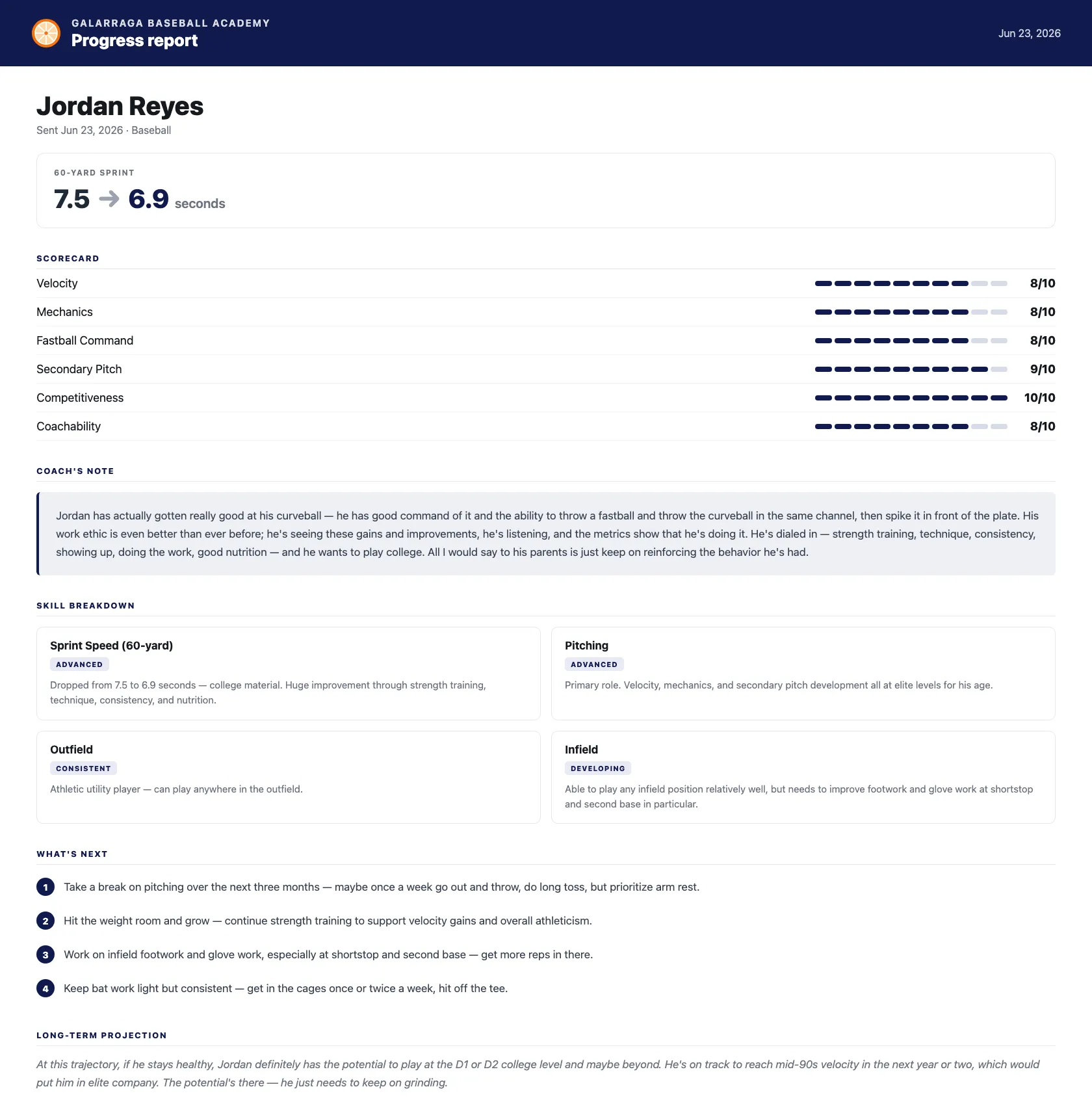
How do coaches write these without spending an evening?
They don't write them at all — they answer a few questions and review the draft. Here's the flow:
- 1
An AI assistant coach interviews you
Answer a few guided questions about the player — the assistant adapts and follows up, by voice or text, in English or Spanish. Minutes, not an evening of writing.
- 2
AI drafts a structured report
Your answers become a clean report: a headline measurable, a skills scorecard, a personal coach note, concrete next steps, and an honest long-term projection.
- 3
Review, then send
Edit anything, then share it. Parents open it from a link or short code — no app, no login.
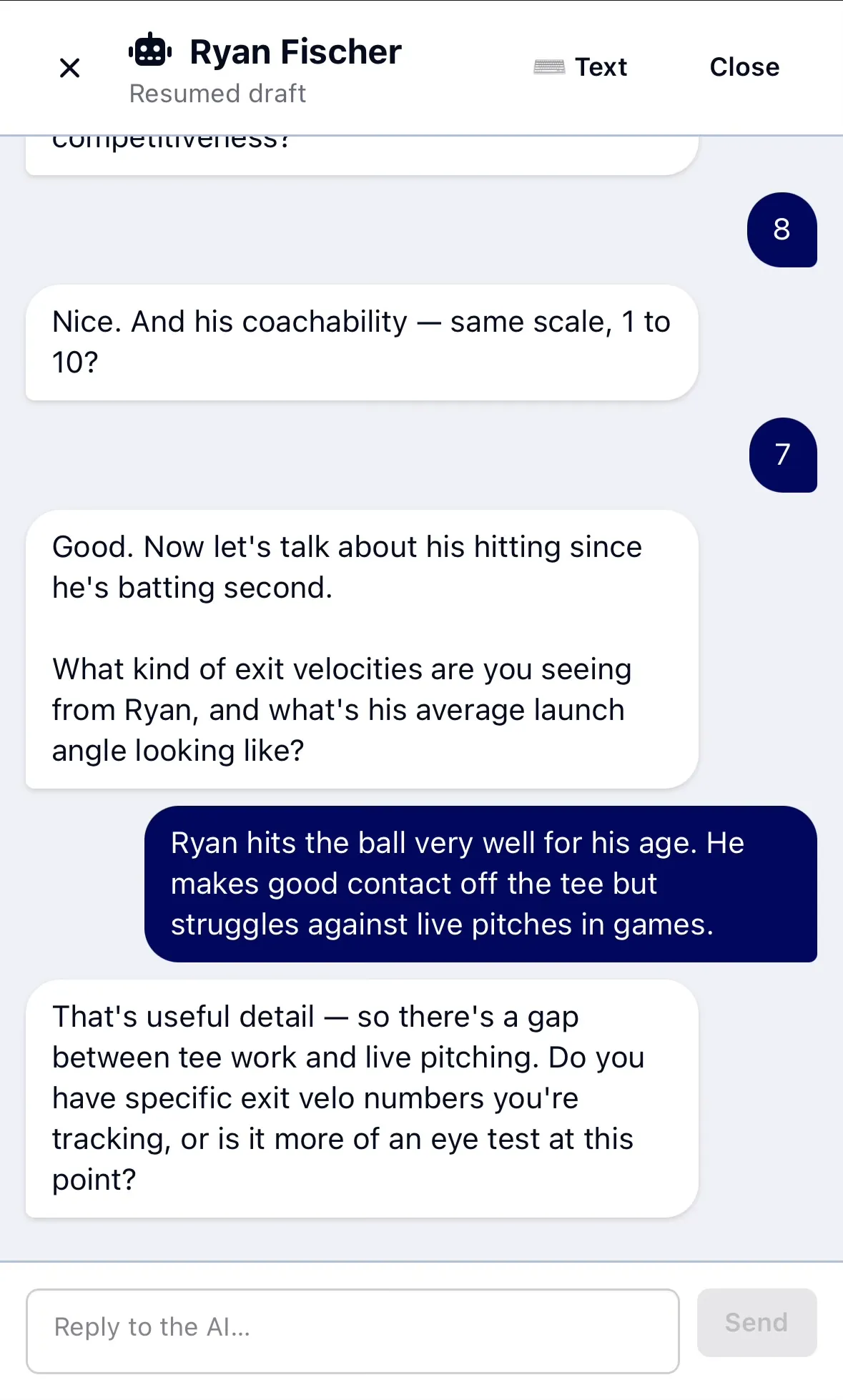
The AI assistant coach
An AI assistant coach writes the first draft
You don't fill out a form. An AI assistant coach interviews you — one question at a time, adapting to your answers and asking smart follow-ups for the details that matter. Answer by voice or text, in English or Spanish, and the conversation becomes a structured report.
- A real back-and-forth — it asks, you answer, it follows up
- Adapts to each player — “he's batting second, so let's talk hitting”
- Answer by voice or text, in English or Spanish
- Pick up a resumed draft whenever you have a minute
- Every answer becomes part of the finished report
Progress notes
You don't start from a blank page
The hard part of a progress report isn't writing it — it's remembering. Something you noticed in June is gone by November. So log it when you see it: one sentence, from your phone, in about a minute. Then when you sit down to write the report, the interview opens by asking about what you logged.
- Say one thing about a player — it writes the note, you don't
- About a minute, standing up, between innings
- They stack up on the player all season, alongside past reports
- Send one to the family now, or later, or never — your call
- At season's end the report interview opens from them
Consistent across your program
Every coach produces the same high-quality report structure — no more wildly different write-ups team to team.
Honest, not fluffy
Reports lead with concrete next steps and a real projection, not empty praise. That's what earns parent trust.
Builds a record over time
Each report joins the player's history, so you can see development across a season and beyond.
Frequently asked questions
- What is a youth player progress report?
- It's a short, structured summary of how a player is developing — what they're good at, what to work on next, and where they project. OrangeSlice generates one from a quick coach interview so it's consistent and takes minutes instead of an evening.
- How does OrangeSlice create the report?
- A coach answers a few guided questions about the player. AI turns those answers into a report with a headline metric, a skills scorecard, a coach note, concrete next steps, and a long-term projection. The coach reviews and edits before anything is sent.
- Do parents need an app or account to read it?
- No. Parents open the report from a secure link or a short access code — nothing to install, no password. It's built to be read on a phone and forwarded.
- Can coaches do interviews in Spanish?
- Yes. The interview supports Spanish, and the finished report is produced in clear English so it's consistent across your program.
- What goes in the report?
- A headline measurable (e.g. exit velocity before/now), a 1–10 scorecard across skill categories, a short personal coach note, a skill or pitch breakdown, three to four specific next steps, and a one- to three-sentence long-term projection.